Wrike's 2025: Top Innovations in Project Management Automation and Collaboration
Wrike's 2025 updates focus on streamlining workflows, boosting team collaboration, and leveraging the power of AI to automate tasks, as well as other improvements. These enhancements aim to empower teams and improve efficiency in project management.
Wrike Unveils Top 10 Product Innovations of 2025
For professionals navigating the ever-evolving landscape of project management software, staying abreast of the latest advancements is crucial. Wrike, a prominent player in the collaborative work management space, has just released a recap of its top 10 product updates from 2025. These enhancements focus on streamlining workflows, boosting team collaboration, and leveraging the power of AI to automate tasks.
This article, based on Wrike's recent announcement, breaks down the key improvements and explores how they can benefit organizations striving for greater efficiency and productivity. For those preferring a visual overview, a video walkthrough featuring Wrike team members Jillian and Beau is available.
Key Enhancements to Wrike in 2025
Wrike's 2025 updates span a range of functionalities, all designed to make project management more intuitive and effective. Here are some of the highlights:
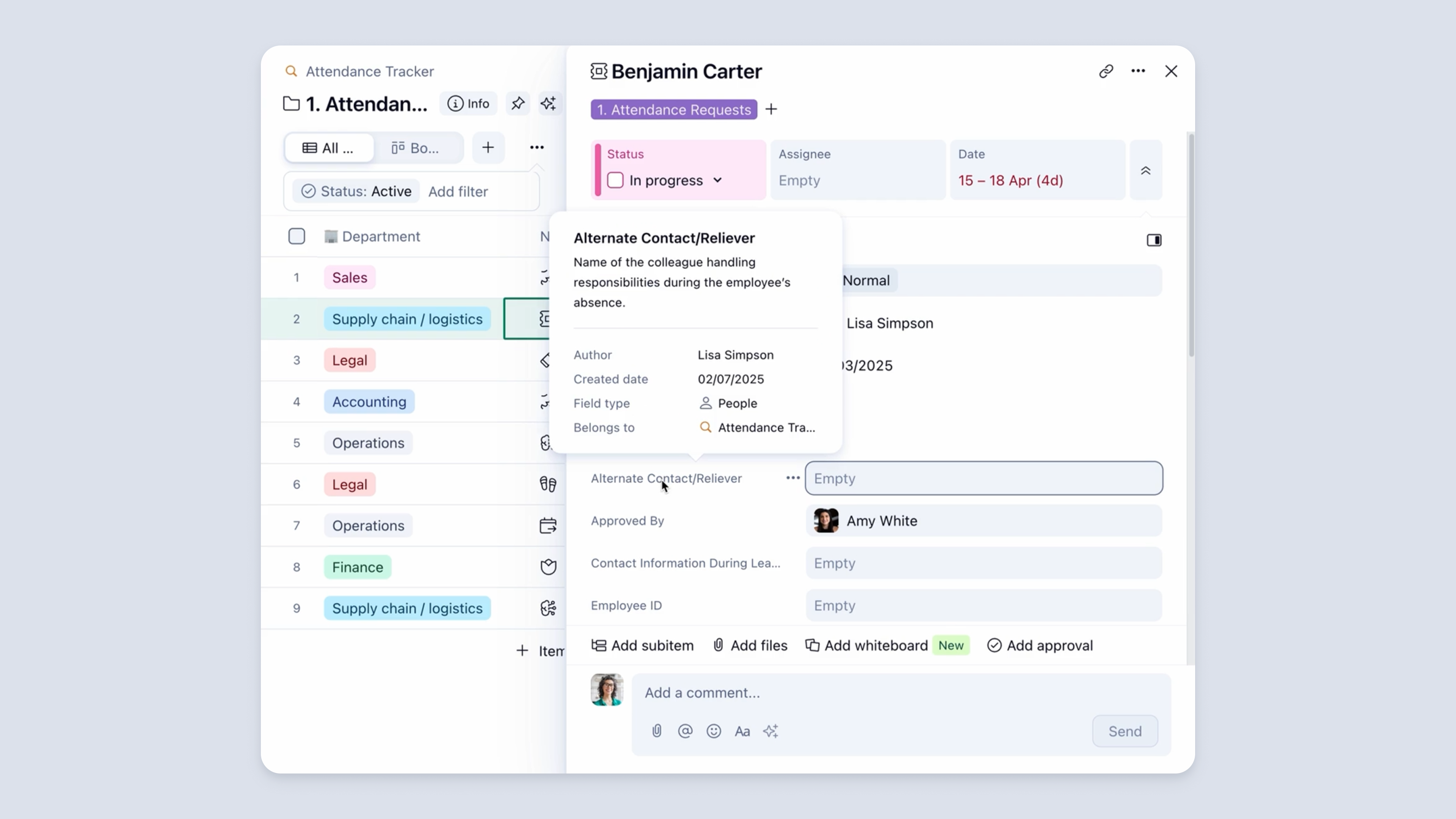
1. Custom Field Descriptions for Clarity
Eliminating confusion and ensuring everyone is on the same page is a constant challenge in project management. Wrike addressed this with the introduction of custom field descriptions. Now, users can add clarifying descriptions to custom fields, which appear when hovering over table columns or when adding/selecting custom fields. This feature is particularly useful for organizations using industry-specific jargon or internal acronyms, reducing ambiguity and accelerating task comprehension.
2. Dynamic Date Management for Agile Planning
In today's fast-paced business environment, project timelines are rarely set in stone. Wrike's dynamic date management capabilities provide the flexibility needed to adapt to changing priorities and unforeseen delays. This feature allows users to automatically adjust dependent task dates based on changes to predecessor tasks, ensuring that project timelines remain realistic and achievable.
3. Enhanced Dashboards with Workflow Metrics
Effective project management relies on clear visibility into progress and potential roadblocks. Wrike's enhanced dashboards now offer deeper insights into workflow metrics, allowing users to track the amount of time tasks spend in various statuses. This provides a clearer understanding of project bottlenecks and helps teams identify areas for improvement.
4. Klaxoon Integration for Visual Collaboration
Brainstorming and idea generation are essential components of successful project initiation. Wrike's integration with Klaxoon's Whiteboard feature facilitates visual collaboration, enabling teams to brainstorm ideas and transform them into actionable tasks. The integration also leverages AI assistance to further streamline the process and boost productivity.
5. AI Agents for Task Automation
One of the most exciting developments in project management software is the integration of artificial intelligence. Wrike's AI Agents automate repetitive tasks and provide intelligent insights, freeing up team members to focus on higher-value activities. These AI-powered assistants can handle routine tasks such as data entry, report generation, and task assignment, resulting in significant time savings and improved efficiency.
6. Custom Space Templates for Workflow Replication
Consistency and efficiency are key to scaling project management processes. Wrike's custom space templates enable teams to quickly replicate successful workflows and structures across multiple projects. This saves valuable setup time and ensures that new projects are launched with a proven framework, promoting consistency and reducing the risk of errors.
7. Improved User Interface for Enhanced Experience
A clean and intuitive user interface can significantly improve user adoption and overall productivity. Wrike has invested in a refreshed visual experience, making the platform more user-friendly and accessible. This includes improvements to navigation, layout, and visual cues, making it easier for users to find the information they need and complete tasks efficiently.
8. Advanced Reporting and Analytics
Data-driven decision-making is essential for optimizing project performance. Wrike's advanced reporting and analytics capabilities provide users with comprehensive insights into project progress, resource allocation, and team performance. These reports can be customized to track specific metrics and identify trends, enabling project managers to make informed decisions and drive continuous improvement.
9. Enhanced Security Features
In today's digital landscape, security is paramount. Wrike has implemented enhanced security features to protect sensitive project data and ensure compliance with industry regulations. These features include advanced encryption, access controls, and audit logging, providing organizations with peace of mind knowing that their data is secure.
10. Mobile App Improvements
In an increasingly mobile world, the ability to manage projects on the go is crucial. Wrike's mobile app has been updated with a range of improvements, including a redesigned interface, enhanced functionality, and improved performance. This allows users to stay connected and manage their projects from anywhere, at any time.
Conclusion
Wrike's 2025 product updates demonstrate a clear commitment to empowering teams with the tools they need to succeed in today's dynamic work environment. By focusing on automation, collaboration, and data-driven decision-making, Wrike continues to evolve as a leading solution for organizations seeking to optimize their project management processes. Professionals looking for project management tools should carefully consider the features and benefits highlighted in these updates to determine if Wrike is the right fit for their needs.
Related Tools
Related Articles
Beyond Policy: How Wrike's 'Women of Wrike' Initiative Empowers Female Professionals
Wrike's 'Women of Wrike' (WoW) initiative is an employee-led program empowering female professionals through mentorship, workshops, and networking. WoW addresses challenges women face in career advancement, fostering a supportive environment and promoting equity within the company.
Bridging the Gap: Integrating Construction Project Management with QuickBooks for Financial Harmony
Integrating project management software with QuickBooks streamlines financial workflows, reduces errors, and enhances communication for construction teams. Key features to consider include job-level tracking, progress invoicing, and time-based labor cost allocation.
Wrike Streamlines Franchise Onboarding for Buzz Franchise Brands, Boosting Efficiency
Buzz Franchise Brands streamlined its franchise onboarding process using Wrike, transforming a fragmented, multi-platform system into efficient, centralized workflows. This resulted in significant time savings, improved task tracking, and enhanced visibility across teams, enabling the company to scale its franchise operations more effectively.