Streamline Project Onboarding: Choosing PM Software That Clicks From Day One
Selecting the right project management software for new users hinges on usability and a smooth learning curve. Prioritize tools with intuitive interfaces, visual task management, and comprehensive onboarding resources to empower your team from the start.
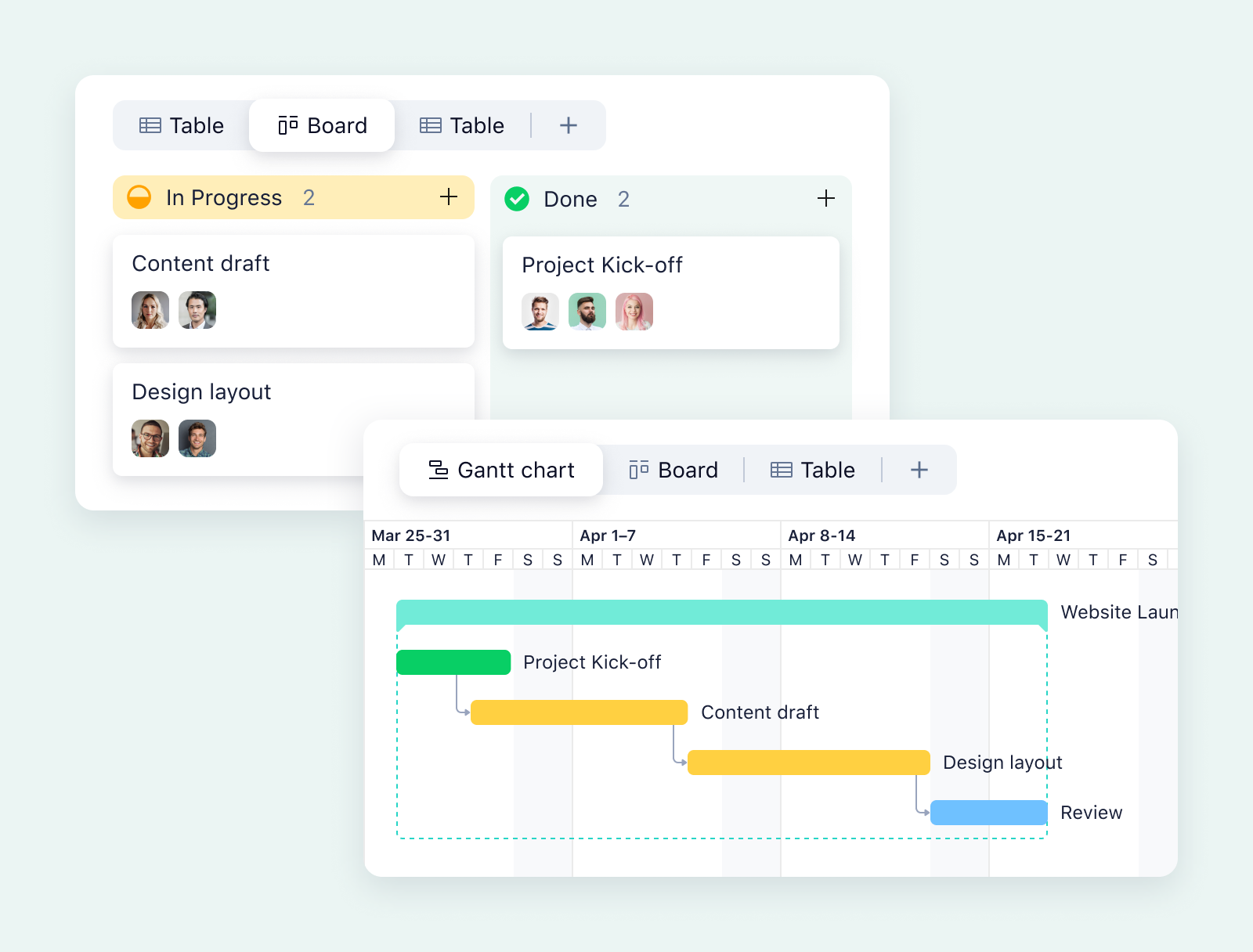
Selecting project management (PM) software can be daunting, especially when onboarding new team members. The ideal solution isn't necessarily the most feature-rich; it's the one that aligns best with your team's immediate needs and offers a seamless learning curve. This article cuts through the noise, providing a practical guide to choosing PM software that empowers your team to hit the ground running.
Focus on Core Needs, Not Just Features
Begin by identifying the three to five fundamental activities your team performs daily. These might include task assignment, deadline management, file sharing, or timeline monitoring. These core functions should be the non-negotiable criteria for your PM software selection. Don't be swayed by flashy extras if the basics aren't covered effectively. A robust tool should primarily facilitate tracking, assigning, scheduling, and collaborating on project tasks.
Creating a Needs Matrix
Develop a simple matrix that distinguishes between essential requirements and desirable, but optional, features. Document any critical integrations with existing tools like Google Workspace, Slack, or Microsoft Outlook. Keep in mind that integration capabilities can significantly impact day-to-day usability.
|
Activity or Workflow |
Must-Have or Nice-to-Have |
Integration Needed (if any) |
|
Assign and track tasks |
Must-have |
Slack (task notifications) |
|
Set due dates and reminders |
Must-have |
Google Calendar |
|
Share files and documents |
Must-have |
Google Drive, Dropbox |
|
Generate project reports |
Nice-to-have |
None |
Key Features for Beginner-Friendly PM Software
When evaluating PM software for new users, prioritize the following features:
- Intuitive Interface: A clean, uncluttered interface reduces the learning curve and promotes faster adoption.
- Visual Task Management: Kanban boards and Gantt charts provide visual representations of project progress, making it easier for beginners to grasp timelines and dependencies.
- Pre-Built Templates: Ready-to-use templates for common project types accelerate setup and ensure consistency.
- Real-Time Collaboration: Features like in-app messaging, file sharing, and collaborative editing foster teamwork and keep everyone on the same page.
- Simple Task Management: Easy task creation, assignment, and tracking are essential for beginners.
The Trial by Fire: Testing with Real Projects
The most effective way to assess software fit is to test it with a real project. This allows you to evaluate the onboarding process, identify potential roadblocks, and gauge how quickly new users can become productive. Track the time it takes for newcomers to complete their first tasks. This metric provides a clear indication of the software's ease of use.
Onboarding Resources: A Critical Success Factor
Comprehensive onboarding resources are vital for successful software adoption. Look for software that offers:
- Tutorials: Step-by-step guides that walk users through key features and workflows.
- Walkthroughs: Interactive guides that demonstrate how to perform specific tasks.
- Responsive Support: Prompt and helpful support channels to address user questions and issues.
- Knowledge Base: A comprehensive repository of articles, FAQs, and troubleshooting tips.
High-quality onboarding resources minimize frustration and accelerate the learning process, ultimately leading to greater user satisfaction and software adoption.
Future-Proofing Your Investment: Scalability and Pricing
Consider the software's scalability as your team grows and project needs evolve. Investigate the features available in starter plans versus advanced plans. Pay close attention to pricing models, as some can become prohibitively expensive as your team expands. Look for solutions that offer flexible pricing and feature tiers to accommodate future growth.
Key Scalability Considerations:
- User Limits: Understand how the pricing changes as you add more users.
- Feature Add-ons: Determine if essential features require upgrading to a higher-tier plan.
- Storage Capacity: Ensure the software offers sufficient storage space for your project files and data.
- Integration Options: Confirm that the software can integrate with new tools and platforms as your needs evolve.
Final Thoughts
Choosing the right project management software for new users is about finding the sweet spot between functionality, usability, and scalability. By focusing on core needs, prioritizing beginner-friendly features, conducting thorough trials, and considering future growth, you can select a tool that empowers your team to collaborate effectively and achieve project success from day one.
Related Tools
Related Articles
Beyond Policy: How Wrike's 'Women of Wrike' Initiative Empowers Female Professionals
Wrike's 'Women of Wrike' (WoW) initiative is an employee-led program empowering female professionals through mentorship, workshops, and networking. WoW addresses challenges women face in career advancement, fostering a supportive environment and promoting equity within the company.
Bridging the Gap: Integrating Construction Project Management with QuickBooks for Financial Harmony
Integrating project management software with QuickBooks streamlines financial workflows, reduces errors, and enhances communication for construction teams. Key features to consider include job-level tracking, progress invoicing, and time-based labor cost allocation.
Wrike Streamlines Franchise Onboarding for Buzz Franchise Brands, Boosting Efficiency
Buzz Franchise Brands streamlined its franchise onboarding process using Wrike, transforming a fragmented, multi-platform system into efficient, centralized workflows. This resulted in significant time savings, improved task tracking, and enhanced visibility across teams, enabling the company to scale its franchise operations more effectively.