Supercharge Your Agile Retrospectives with Visual Collaboration: A Deep Dive into Wrike Whiteboard
Wrike Whiteboard emerges as a compelling solution for teams seeking a dynamic and intuitive platform to conduct visual retrospectives, fostering engagement, enhancing information retention, and driving more effective discussions. It empowers teams to conduct engaging and effective retrospectives, streamlining the process from start to finish.
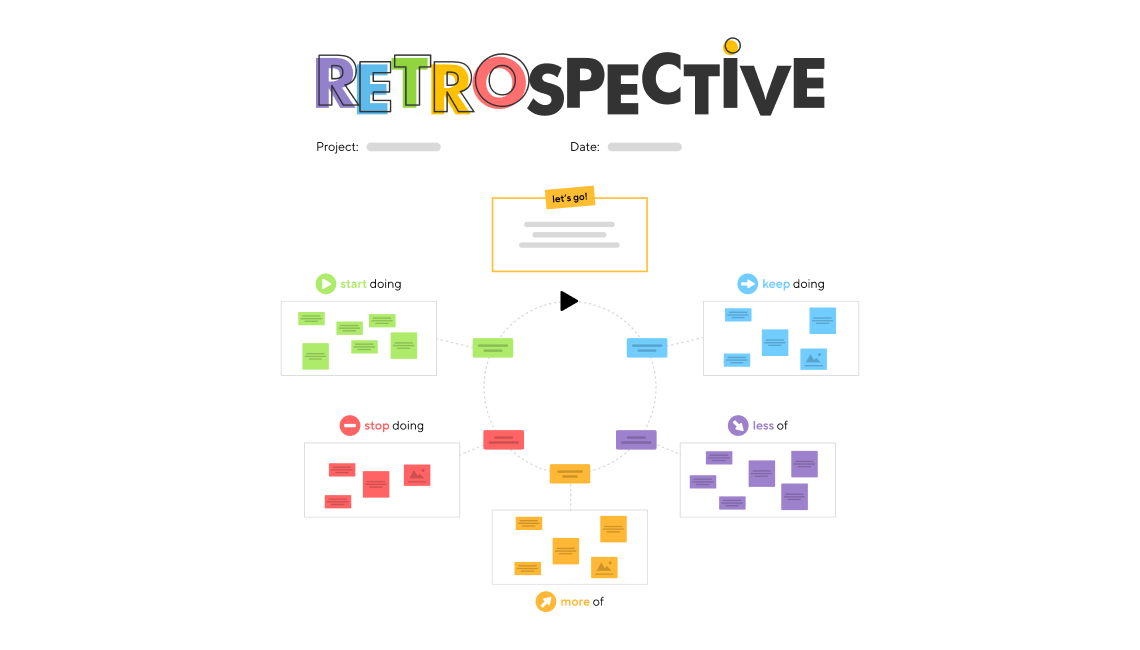
Elevating Team Performance Through Visual Retrospectives
As the year draws to a close, project teams are entering the crucial phase of reflection and planning. A well-executed retrospective is paramount for distilling key learnings, optimizing workflows, and setting the stage for future successes. Visual retrospectives, in particular, offer a powerful medium for fostering engagement, enhancing information retention, and driving more effective discussions.
For teams seeking a dynamic and intuitive platform to conduct these retrospectives, Wrike Whiteboard emerges as a compelling solution.
Why Visual Retrospectives Matter
Traditional retrospectives, while valuable, can sometimes fall short in capturing the full spectrum of team experiences and insights. Visual collaboration tools address this limitation by providing a shared canvas for brainstorming, ideation, and collective problem-solving. Visual learners, who constitute a significant portion of the workforce, particularly benefit from this approach, as it facilitates better comprehension and recall.
By leveraging visual elements, teams can:
- Increase participation and engagement
- Improve information retention
- Facilitate clearer communication
- Identify patterns and trends more easily
- Foster a more collaborative and inclusive environment
Wrike Whiteboard: A Comprehensive Solution for Agile Retrospectives
Wrike Whiteboard is an interactive visual workspace designed to enhance team collaboration and productivity. It empowers teams to conduct engaging and effective retrospectives, streamlining the process from start to finish. Here's how Wrike Whiteboard can transform your retrospective sessions:
Intuitive Interface and Customizable Templates
Wrike Whiteboard offers a user-friendly interface that is easy to navigate, even for first-time users. The platform also provides a range of pre-designed templates tailored to different retrospective formats, such as:
- Start, Stop, Continue: Identifies actions to initiate, discontinue, and maintain.
- Mad, Sad, Glad: Captures emotional responses to events during the sprint.
- What Went Well, What Didn't: Focuses on successes and areas for improvement.
Teams can customize these templates to suit their specific needs and preferences, ensuring that the retrospective aligns perfectly with their goals.
AI-Powered Assistance
Wrike Whiteboard incorporates AI-powered tools to further enhance the retrospective process. The AI assistant can help teams:
- Generate ideas and prompts
- Identify recurring themes and patterns
- Summarize key takeaways
- Facilitate decision-making
Seamless Integration with Wrike Tasks
One of the key advantages of using Wrike Whiteboard is its seamless integration with Wrike's task management capabilities. Ideas and action items generated during the retrospective can be easily converted into actionable tasks within Wrike, ensuring that insights translate into tangible results.
This integration eliminates the need for manual data transfer and reduces the risk of losing valuable information.
Steps to Creating an Effective Visual Retrospective with Wrike Whiteboard
Here's a step-by-step guide to conducting a successful visual retrospective using Wrike Whiteboard:
- Set up your whiteboard: Create a new whiteboard within Wrike and invite team members to participate.
- Select a template or use the AI assistant: Choose a pre-designed template or leverage the AI assistant to create a customized retrospective board.
- Customize the board: Tailor the board to your team's specific needs by adding columns, prompts, and visual elements.
- Conduct the retrospective: Facilitate a collaborative discussion, encouraging team members to share their thoughts and ideas on the board.
- Convert insights into action: Transform key takeaways into actionable Wrike tasks, assigning ownership and deadlines as needed.
Transitioning from Retrospectives to Action Plans
The true value of a retrospective lies in its ability to drive positive change. By converting insights into concrete action plans, teams can continuously improve their performance and achieve their goals.
Wrike Whiteboard makes this transition seamless by allowing teams to directly create and assign tasks based on the retrospective findings. This ensures that everyone is aligned on the next steps and that progress is tracked effectively.
Conclusion
Visual retrospectives offer a powerful way to enhance team collaboration, improve communication, and drive continuous improvement. Wrike Whiteboard provides a comprehensive platform for conducting engaging and effective visual retrospectives, streamlining the process from ideation to action. By leveraging Wrike Whiteboard, teams can unlock their full potential and achieve greater success.
Related Tools
Related Articles
Beyond Policy: How Wrike's 'Women of Wrike' Initiative Empowers Female Professionals
Wrike's 'Women of Wrike' (WoW) initiative is an employee-led program empowering female professionals through mentorship, workshops, and networking. WoW addresses challenges women face in career advancement, fostering a supportive environment and promoting equity within the company.
Bridging the Gap: Integrating Construction Project Management with QuickBooks for Financial Harmony
Integrating project management software with QuickBooks streamlines financial workflows, reduces errors, and enhances communication for construction teams. Key features to consider include job-level tracking, progress invoicing, and time-based labor cost allocation.
Wrike Streamlines Franchise Onboarding for Buzz Franchise Brands, Boosting Efficiency
Buzz Franchise Brands streamlined its franchise onboarding process using Wrike, transforming a fragmented, multi-platform system into efficient, centralized workflows. This resulted in significant time savings, improved task tracking, and enhanced visibility across teams, enabling the company to scale its franchise operations more effectively.