Navigating the Post-Microsoft Project Era: Why Wrike Emerges as a Leading Alternative
With Microsoft Project Online sunsetting, many are seeking robust alternatives. Wrike offers a compelling solution with comprehensive features designed to replicate familiar functionalities while enhancing collaboration and visibility.
Microsoft's announcement of the impending retirement of Microsoft Project Online by September 2026 has left many project managers seeking robust and reliable alternatives. For professionals deeply entrenched in the Microsoft Project ecosystem, the transition requires careful consideration. The key question is: how can teams maintain, and even enhance, their project planning capabilities?
This article explores why Wrike is positioned as a compelling solution for teams migrating from Microsoft Project. Wrike offers a comprehensive suite of features designed to not only replicate familiar functionalities but also introduce enhanced collaboration and visibility.
Maintaining Rigorous Project Management
A common concern among experienced project managers is that modern work management platforms might oversimplify complex project needs. It's crucial to understand that Wrike is not simply a task management application. It's a platform engineered to handle intricate initiatives requiring detailed planning and execution.
Wrike is designed to meet and exceed the expectations set by traditional project management tools. Let's delve into the specifics.
Gantt Charts: A Powerful and Intuitive Interface
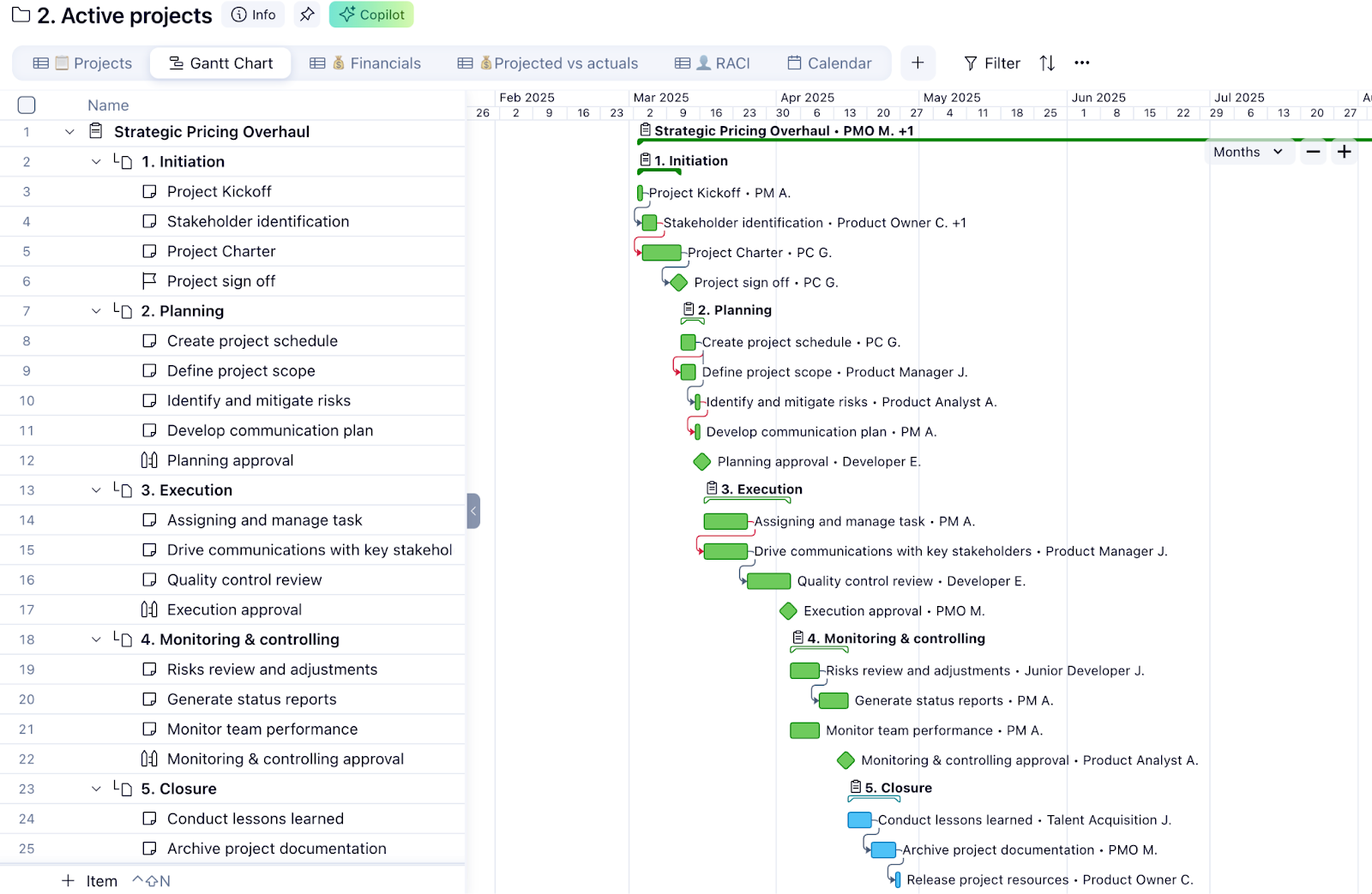
For project managers who rely heavily on Gantt charts, Wrike provides a familiar yet modernized experience. The Gantt chart functionality in Wrike is not a mere imitation; it's an advanced tool built for effective project management.
- Intuitive Project Planning: Wrike's Gantt charts allow for easy task creation, scheduling, and duration adjustments. The drag-and-drop interface enables effortless rescheduling of entire projects.
- Dependency Management: Managing task dependencies is critical for maintaining project timelines. Wrike simplifies this process, allowing users to easily link tasks and visualize dependencies within the Gantt chart.
- Critical Path Analysis: Identifying the critical path is essential for understanding the tasks that directly impact project completion. Wrike automatically calculates and displays the critical path, enabling project managers to focus on the most important activities.
- Baseline Comparisons: Tracking project progress against the original plan is crucial for identifying deviations and implementing corrective actions. Wrike allows users to set baselines and compare current progress against the initial plan, providing valuable insights into project performance.
Enhanced Collaboration and Communication
Beyond replicating the core functionalities of Microsoft Project, Wrike offers significant improvements in team collaboration and communication. Features that promote transparency and streamline workflows include:
- Real-time Updates: Wrike provides real-time updates on task progress, ensuring that all team members are informed of the latest developments. This eliminates the need for manual status reports and reduces the risk of miscommunication.
- Collaborative Task Management: Wrike allows multiple users to work on the same task simultaneously, fostering collaboration and accelerating project completion. Team members can easily share files, exchange feedback, and track changes within the task interface.
- Customizable Dashboards: Wrike's customizable dashboards provide a centralized view of project status, enabling project managers to monitor progress, identify bottlenecks, and make data-driven decisions. Dashboards can be tailored to display key performance indicators (KPIs) and other relevant metrics.
- Automated Workflows: Wrike's automation capabilities streamline repetitive tasks, freeing up project managers to focus on more strategic activities. Automated workflows can be configured to trigger actions based on specific events, such as task completion or status changes.
Seamless Integration with Existing Tools
Wrike integrates with a wide range of popular business applications, including Microsoft Office 365, Google Workspace, and Salesforce. This seamless integration allows teams to connect Wrike with their existing tools and workflows, minimizing disruption and maximizing productivity.
- Microsoft Office 365 Integration: Wrike integrates with Microsoft Office 365, allowing users to access and share files directly from Wrike. This integration streamlines document management and eliminates the need to switch between applications.
- Google Workspace Integration: Wrike integrates with Google Workspace, providing users with access to Google Docs, Sheets, and Slides directly from Wrike. This integration fosters collaboration and enables teams to work seamlessly across platforms.
- Salesforce Integration: Wrike integrates with Salesforce, allowing teams to connect project data with customer information. This integration provides valuable insights into project performance and enables sales teams to track project progress in real-time.
Data Migration and Onboarding
Migrating from Microsoft Project to Wrike can seem daunting, but Wrike offers comprehensive support and resources to ensure a smooth transition. Wrike provides tools and services to facilitate data migration, including:
- Project Import: Wrike allows users to import project data from Microsoft Project files, preserving task dependencies, timelines, and resource assignments.
- Dedicated Support: Wrike offers dedicated support to assist with data migration, onboarding, and training. Their team of experts can help teams plan and execute their migration strategy, ensuring a successful transition.
- Training Resources: Wrike provides a variety of training resources, including online tutorials, webinars, and documentation. These resources help teams learn how to use Wrike effectively and maximize its benefits.
Conclusion
As Microsoft Project Online approaches its end-of-life, Wrike presents a viable, and even superior, alternative for project management professionals. Its robust Gantt chart functionality, enhanced collaboration features, seamless integrations, and comprehensive support make it a natural evolution for teams seeking to maintain and improve their project management capabilities. By embracing Wrike, organizations can navigate the changing landscape with confidence and ensure continued success in their project endeavors.
Related Tools
Related Articles
Beyond Policy: How Wrike's 'Women of Wrike' Initiative Empowers Female Professionals
Wrike's 'Women of Wrike' (WoW) initiative is an employee-led program empowering female professionals through mentorship, workshops, and networking. WoW addresses challenges women face in career advancement, fostering a supportive environment and promoting equity within the company.
Bridging the Gap: Integrating Construction Project Management with QuickBooks for Financial Harmony
Integrating project management software with QuickBooks streamlines financial workflows, reduces errors, and enhances communication for construction teams. Key features to consider include job-level tracking, progress invoicing, and time-based labor cost allocation.
Wrike Streamlines Franchise Onboarding for Buzz Franchise Brands, Boosting Efficiency
Buzz Franchise Brands streamlined its franchise onboarding process using Wrike, transforming a fragmented, multi-platform system into efficient, centralized workflows. This resulted in significant time savings, improved task tracking, and enhanced visibility across teams, enabling the company to scale its franchise operations more effectively.