Mastering Project Timelines: A Practical Guide to Gantt Chart Structures
Gantt charts are essential for visualizing project timelines and dependencies. Choosing the right structure, tailored to the project's context, unlocks their full potential for effective project management, enhancing clarity and control.
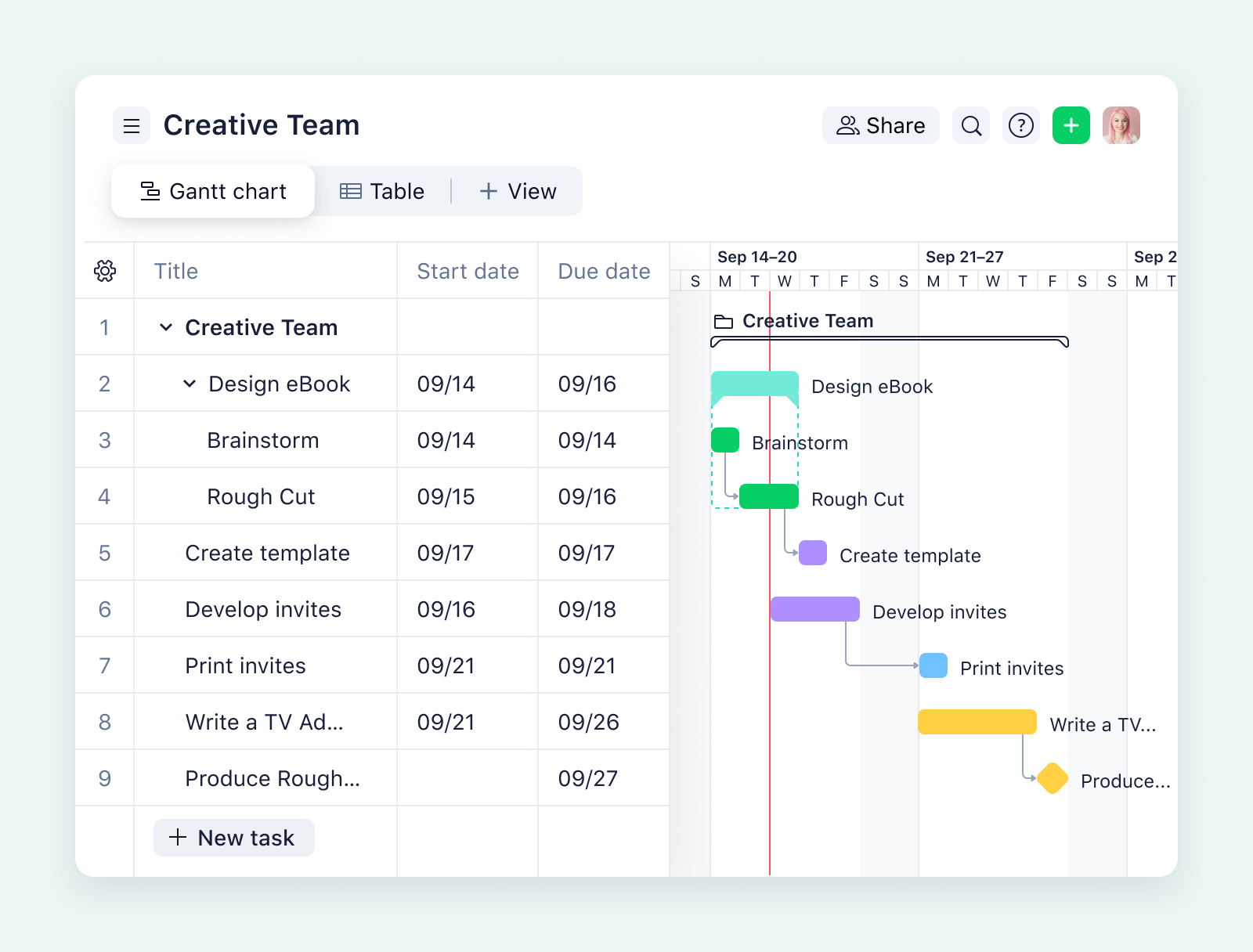
Demystifying Gantt Charts: A Guide to Effective Project Visualization
In today's fast-paced project environments, visualizing timelines and dependencies is crucial. Gantt charts offer a powerful way to represent project tasks, durations, and milestones. However, the effectiveness of a Gantt chart hinges on its structure and how well it reflects the project's dynamics. This guide explores practical applications of Gantt charts, focusing on structural elements that drive clarity and control.
Why Gantt Charts Matter
Gantt charts transform complex projects into manageable visual roadmaps. They provide a unified view of tasks, responsibilities, and deadlines, fostering better communication and accountability among team members. By clearly displaying task dependencies and potential bottlenecks, Gantt charts empower project managers to proactively address challenges and keep projects on track.
Key Elements of Effective Gantt Charts
Before diving into specific examples, let's review the essential elements of a well-designed Gantt chart:
- Task Bars: Represent the duration of each task.
- Task Dependencies: Illustrate the relationships between tasks, highlighting which tasks must be completed before others can begin.
- Milestones: Mark significant progress points or deliverables.
- Date Line: Provides a visual reference for tracking project progress against the planned timeline.
Context is King: Tailoring Gantt Charts to Project Needs
The optimal structure for a Gantt chart depends heavily on the project's context. A simple project with sequential tasks may require a straightforward linear chart. Complex projects involving multiple teams and dependencies may benefit from a more sophisticated structure. Consider these factors when designing your Gantt chart:
- Project Scope: The size and complexity of the project.
- Team Structure: How the project team is organized and the relationships between teams.
- Dependencies: The number and complexity of task dependencies.
- Timeline: The overall project duration and key deadlines.
Five Approaches to Structuring Gantt Charts
Here are five common approaches to structuring Gantt charts, each suited to different project types:
1. Task-Based Gantt Chart
This is the most common type of Gantt chart, where tasks are listed vertically, and their durations are represented by horizontal bars. It is well-suited for projects with a clear sequence of tasks and well-defined deliverables. The emphasis is on managing individual tasks and ensuring their timely completion.
2. Phase-Based Gantt Chart
Projects divided into distinct phases, such as initiation, planning, execution, and closure, benefit from a phase-based Gantt chart. This structure groups tasks by project phase, providing a high-level overview of progress within each phase. This approach is useful for tracking overall project milestones and identifying potential delays in specific phases.
3. Team-Based Gantt Chart
For projects involving multiple teams, a team-based Gantt chart can enhance collaboration and accountability. This structure organizes tasks by team, allowing project managers to track the progress of each team and identify potential resource conflicts. It promotes transparency and facilitates communication between teams.
4. Milestone-Driven Gantt Chart
In projects where milestones are critical, a milestone-driven Gantt chart emphasizes key deliverables and deadlines. This structure highlights the milestones and the tasks required to achieve them. It is particularly useful for projects with fixed deadlines or regulatory requirements.
5. Agile Gantt Chart
Agile methodologies often use sprints, short iterative development cycles. An Agile Gantt chart visualizes these sprints, showing the tasks included in each sprint and their associated timelines. This structure facilitates sprint planning, tracks sprint progress, and helps identify potential roadblocks within each sprint. The chart reflects the iterative nature of agile development, allowing for continuous adjustments based on feedback and changing requirements.
Maximizing Gantt Chart Effectiveness
To maximize the benefits of Gantt charts, consider these best practices:
- Real-time Updates: Ensure that the Gantt chart is updated regularly to reflect the latest project status.
- Automated Dependencies: Use software features to automatically update task dependencies when changes occur.
- Integrated Risk Management: Incorporate risk management tools to identify and mitigate potential project risks.
- Collaboration Features: Leverage collaboration features to facilitate communication and feedback among team members.
Conclusion
Gantt charts are indispensable tools for effective project management. By understanding the different structural approaches and tailoring the chart to the project's specific context, project managers can unlock the full potential of Gantt charts to visualize timelines, manage dependencies, and drive project success. Choosing the right software to manage your Gantt charts is also crucial; consider tools that offer flexibility, collaboration features, and real-time updates to ensure your project stays on track.
Related Tools
Related Articles
Beyond Policy: How Wrike's 'Women of Wrike' Initiative Empowers Female Professionals
Wrike's 'Women of Wrike' (WoW) initiative is an employee-led program empowering female professionals through mentorship, workshops, and networking. WoW addresses challenges women face in career advancement, fostering a supportive environment and promoting equity within the company.
Bridging the Gap: Integrating Construction Project Management with QuickBooks for Financial Harmony
Integrating project management software with QuickBooks streamlines financial workflows, reduces errors, and enhances communication for construction teams. Key features to consider include job-level tracking, progress invoicing, and time-based labor cost allocation.
Wrike Streamlines Franchise Onboarding for Buzz Franchise Brands, Boosting Efficiency
Buzz Franchise Brands streamlined its franchise onboarding process using Wrike, transforming a fragmented, multi-platform system into efficient, centralized workflows. This resulted in significant time savings, improved task tracking, and enhanced visibility across teams, enabling the company to scale its franchise operations more effectively.